New Firstly New Techniques that I have learnt whilst creating my Prelim Firstly i had to import all the clips from the SD card to the computer. I then put these clips together and edited them.
I edited them by trimming the clips to flow together smoothy. This made a continuity shot.
After i made all these clips flow together, we were allowed to experiment with the tools available to us on Final Cut Pro.
To add diegetic music or titles. These can make the filming more realistic. We can also add sound effects. This can be extremely effective if a certain sound doesn't come up that was intended. For example you can add footsteps.
This is what my editing finally looked like. As you can see there is an assembler. I names this prelims. Then thee was Ambient Hit to bring the audience in, also to cover up some background noise that was not intended.
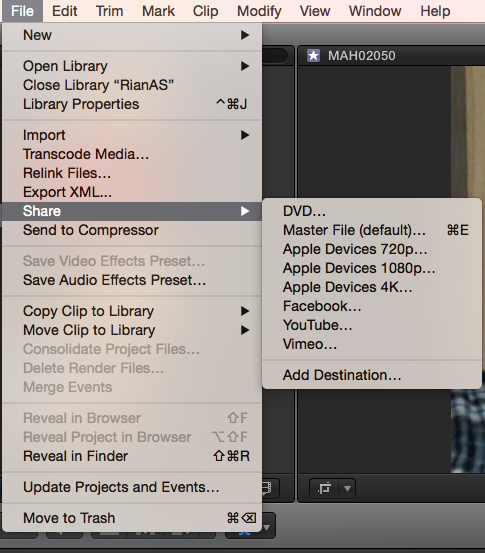
To export the film that you have just created i went to file, share and then clicked master file. This then came up with this. I named it PrelimRian2015. Then clicked onto settings and checked if the HD was okay.
I worked with Niamh filming the prelim, this is the clip from her Youtube.
We used one camera.
The first shot was from behind Alex. We then shot to a close shot of his hand opening the door. Then a continued shot from the front, showing continuity. Close shot of him pulling the chair out and then sitting down.
We then did a shot reverse shot to show the two people making conversation. This was the first time that i had filmed a short clip and used Final cut pro.
- What i earned from the prelim
How to put different shots together to show continuity throughout the prelim. Using the trim tool to edit the length of clips.
I also learnt how to create a new project or event helping me to section off different task in final cut pro. You go to; file, new the pick library for a new subject or creation.
Once you had finished the prelim you had to export it to Youtube, enabling you to upload to blogger. I learnt out to export/share for final cut. Then from youtube you click the share button and the embed. You copy the link and embed to your blog.